I've just read it and wanted to share it.
http://msdn.microsoft.com/en-us/library/hh372952.aspx
It helps debuging plugins even when the Dynamics CRM is ONLINE.
It is great for unit testing.
It is what i was looking for.
Friday, November 4, 2011

Thursday, November 3, 2011
Dynamics CRM 2011 record hyperlink
Dynamics CRM 2011 record hyperlink.
Finally
Microsoft added Insert Hyperlink to send email / email templates in MSCRM 2011 Rollup 5.
The workarounds are finally uneeded anymore.
Walkthrough:
1) Go to send email in workflow
 2) Insert text for display
3) insert the Record URLto the url field.
 4) Click on OK.
Finally
Microsoft added Insert Hyperlink to send email / email templates in MSCRM 2011 Rollup 5.
The workarounds are finally uneeded anymore.
Walkthrough:
1) Go to send email in workflow

3) insert the Record URLto the url field.

Monday, October 31, 2011
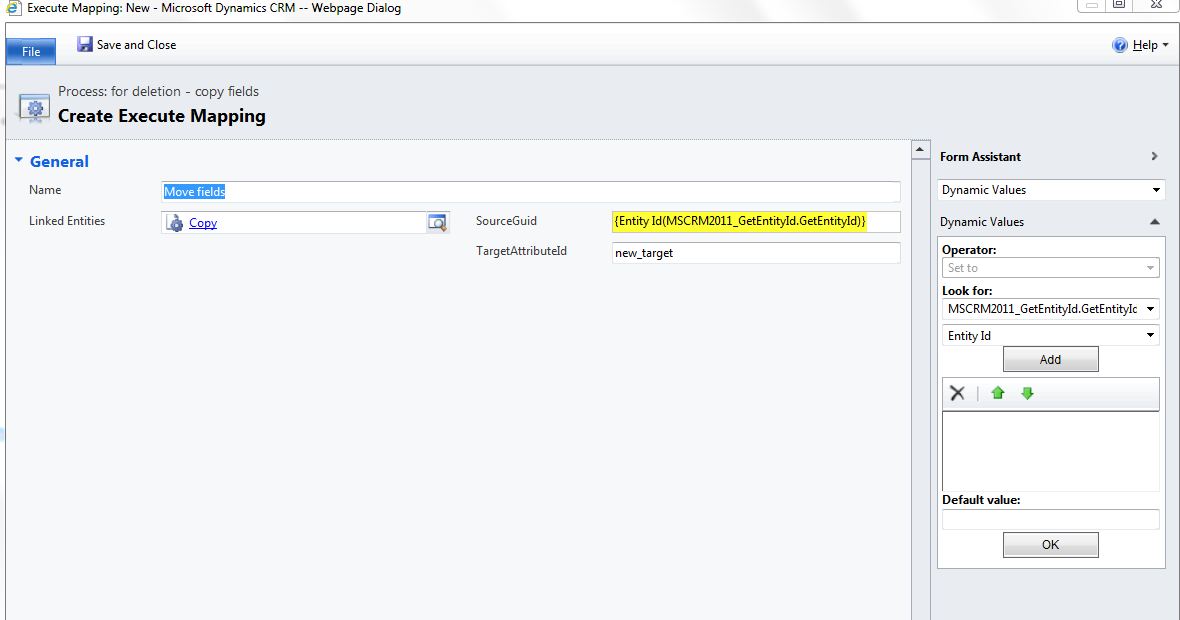
MSCrm 2011 - Workflow Assembly Get Current Entity ID
MSCrm 2011 - Workflow Assembly Get Current Entity ID
This is a workflow assembly that returns the current record ID
(Guid) in Dynamics crm 2011.
There is only one drawback, It won't work in Dynamics CRM 2011
ONLINE because workflow assemblies aren't supported there.
Code:
public class GetEntityId : CodeActivity
{
protected override void
Execute(CodeActivityContext executionContext)
{
//Create the tracing
service
ITracingService
tracingService = executionContext.GetExtension<ITracingService>();
IWorkflowContext context
= executionContext.GetExtension<IWorkflowContext>();
EntityId.Set(executionContext, context.PrimaryEntityId.ToString());
}
[Output("Entity Id")]
public OutArgument<string> EntityId
{ get; set; }
}
Walkthrough:
1) Copy the .dll from the bin folder to <%CRM
folder%>\Server\bin\assembly
2) Use the plugin registration tool to register the workflow
assembly
3) Now you should be able to see it in the Workflow window:

4) After you added it to the Workflow you can use it:
Download Link: https://docs.google.com/open?id=0B8k6R6QcCN7INjU2ZjIwMGQtYTBjYy00MmQ1LWI1ZWQtODg0OWViYmQ3YzRl
Dynamics CRM 2011 ONLINE users walkaround:
Create plugin on post create step insert the id to some
text field.
The plugin has advantage, as it will work on all environments
Plugin version: http://dynamicslollipops.blogspot.com/2011/11/mscrm-2011-get-guid-plugin.html
Sunday, October 16, 2011
MSCRM 2011 Javascript save and close
In 2011 This script doesn't work:
1. Xrm.Page.data.entity.save();
2. window.close();
CRM 4.0 Code ( Worked great):
crmForm.Save();
window.close();
The solution in 2011:
The right why in 4.0
crmForm.SaveAndClose();
and just for closing the window
Xrm.Page.ui.close();
1. Xrm.Page.data.entity.save();
2. window.close();
The solution in 2011:
Xrm.Page.data.entity.save("saveandclose")
The right why in 4.0
crmForm.SaveAndClose();
and just for closing the window
Xrm.Page.ui.close();
Saturday, October 8, 2011
dynamics crm 2011 online lead capture
It's finally here Dynamics CRM 2011 online lead capture is Available
in Israel. After I've read about it,
searched for it and failed to find it few months ago, Finally it's there.
It's easy to connect the CRM to the company's
web page, something that's makes a lot of sense in Customer Relationship Management
system.
More information:
http://www.youtube.com/watch?v=2WNY9DPMY1I
http://www.youtube.com/watch?v=K_qhhZdNgcg
http://www.democrmonline.com/IMWebtoLead/
More information:
http://www.youtube.com/watch?v=2WNY9DPMY1I
http://www.youtube.com/watch?v=K_qhhZdNgcg
http://www.democrmonline.com/IMWebtoLead/
Subscribe to:
Posts (Atom)